Team Registration
Team Registration
Your RAMP account allows Team Contacts to:
- Register your team
- Invite players to your team
- Pay your team fee instalments
Note: If you pay your first instalment with credit card, RAMP keeps your information on file for your second payment.
Team Registration Steps
1. Go to the SAS Registration portal: https://www.rampregistrations.com/login?v3=31526c9470
Registration information can be found on our website under the Registration heading.
Desktop Appearance:

OR

Mobile Appearance:
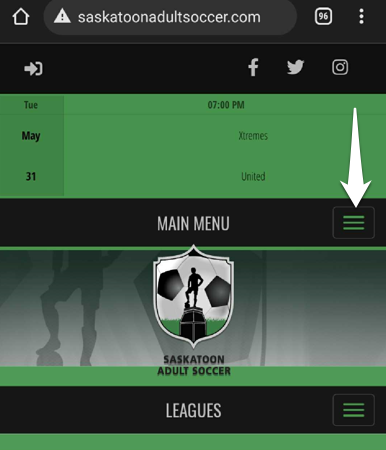
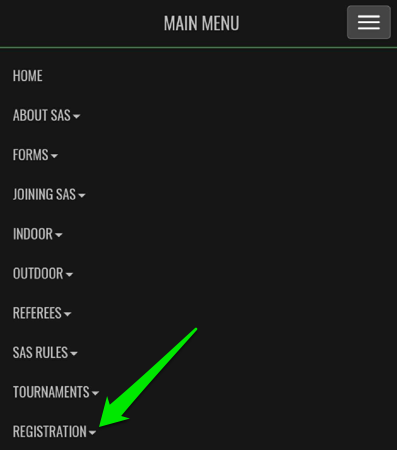
OR

2. Create an Account / Login to your Account
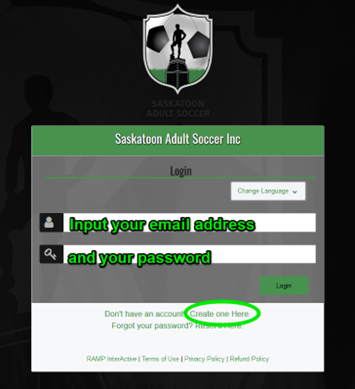
Please create an account unless you have already have an account.
If you have played or entered a team you will already have a profile.
Follow the prompts regarding your password.
We do not have this information for privacy matters. If you forgot your password, please click on “Reset it Here” or “Forgot your password?”.
3. Click TEAM REGISTRATION.
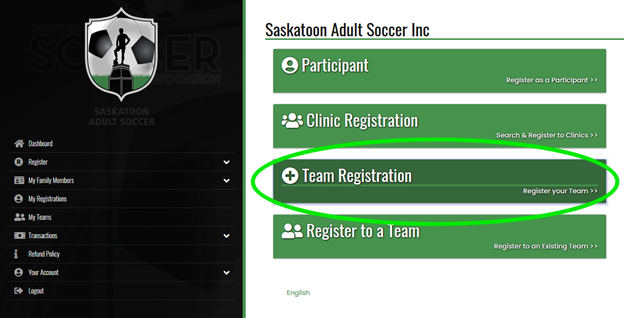
4. Choose appropriate season, division, tier, team contact and team information.
If your team is new to RAMP, create a new team by clicking the drop down arrow.
NCCP # is not required.
5. Select the Package with your preferred Division and New Team bond if appropriate.
6. Answer questions pertaining to your team.
7. Sign and click off Majority box.

8. Select your Payment Type.
Team fees are paid online via RAMP.
Please reach out to info@saskatoonadultsoccer.com for alternative payment options.

9. Submit your Registration.
You're done! That's it!
To confirm, you can verify your registration.
Please click here to go to the RAMP registration system to Login or Create a personal profile.